

Secure Communication App Guide: How to Check Real Privacy
You're waiting at an airport gate when a message arrives asking for your hotel address and a copy of a travel document. The chat displays a padlock, so sending them feels safe. But does that padlock protect the attachment, the backup, and the copy left on your phone?
Choosing a secure communication app means checking more than whether messages are encrypted. The useful question is what each person or company can still see, especially when your conversation includes voice recordings, translated speech, or confidential work. These checks will help you decide what's safe to share and what should stay off the service.
What a Secure Communication App Really Protects
At the gate, you open the conversation and confirm that you're messaging the right person. Before attaching your document, separate the information inside the message from the information surrounding it.
A secure communication app should encrypt what you send so that only the intended conversation participants can read it. End-to-end encryption provides that protection between participating devices, rather than merely protecting the connection to a company's server.
Think of a sealed envelope. The envelope hides the letter, but the postal service can still see the destination and delivery timing. An encrypted conversation similarly needs separate safeguards for its contents, surrounding records, and stored copies.
Your phone is part of that boundary, not just a viewing window.

Check Each Data Layer Separately
What each data layer protects and what stays visible
| Data layer | Protected by end-to-end encryption | Still visible to |
|---|---|---|
| Message text | Yes, when end-to-end encryption is enabled | Only people in the chat, assuming their endpoints remain secure |
| Voice audio | Only if the app encrypts the stream end to end | Provider, if audio is processed in readable form on its servers |
| Transcripts and translations | Often not, when a cloud service processes them in readable form | Translation service during processing |
| Metadata (who, when, how often) | No, not by content encryption alone | Infrastructure and service providers that handle those records |
| Cloud backups | Only when backup encryption settings provide it | Backup provider, if unencrypted or provider-readable |
| Device storage | No, it requires separate device or app storage encryption | Anyone able to access an unlocked phone or unprotected files |
The table is a map of questions, not a promise about every app. For example, encrypted message delivery doesn't establish that an exported transcript receives the same protection.
Treat the Phone as a Separate Security Boundary
A lost phone with no screen lock can expose a readable conversation without anyone breaking its messaging protocol. NIST's mobile application vetting guidance emphasizes protecting sensitive information both while stored and while transmitted, including when a device is lost or stolen.
Set a device passcode, hide sensitive notification previews, and review which linked computers can open your chats. For work conversations, Freeform Company's resource on practical enterprise data protection controls offers useful context for treating communication privacy as part of broader information handling.
Practical rule: Check the message, the service, and the device separately. A strong answer about one doesn't settle the others.
Before sending that attachment, look for specific evidence about the protection your conversation uses.
Transport vs End-to-End Encryption Explained
Transport encryption is a locked courier van. Someone watching the road can't inspect the packages, but the courier company can open them at its depot.
End-to-end encryption adds a locked box inside the van. The sender encrypts the contents for the recipient, and the courier doesn't hold the keys needed to read them.
The distinction is easier to see when the delivery route and the message lock are shown separately.
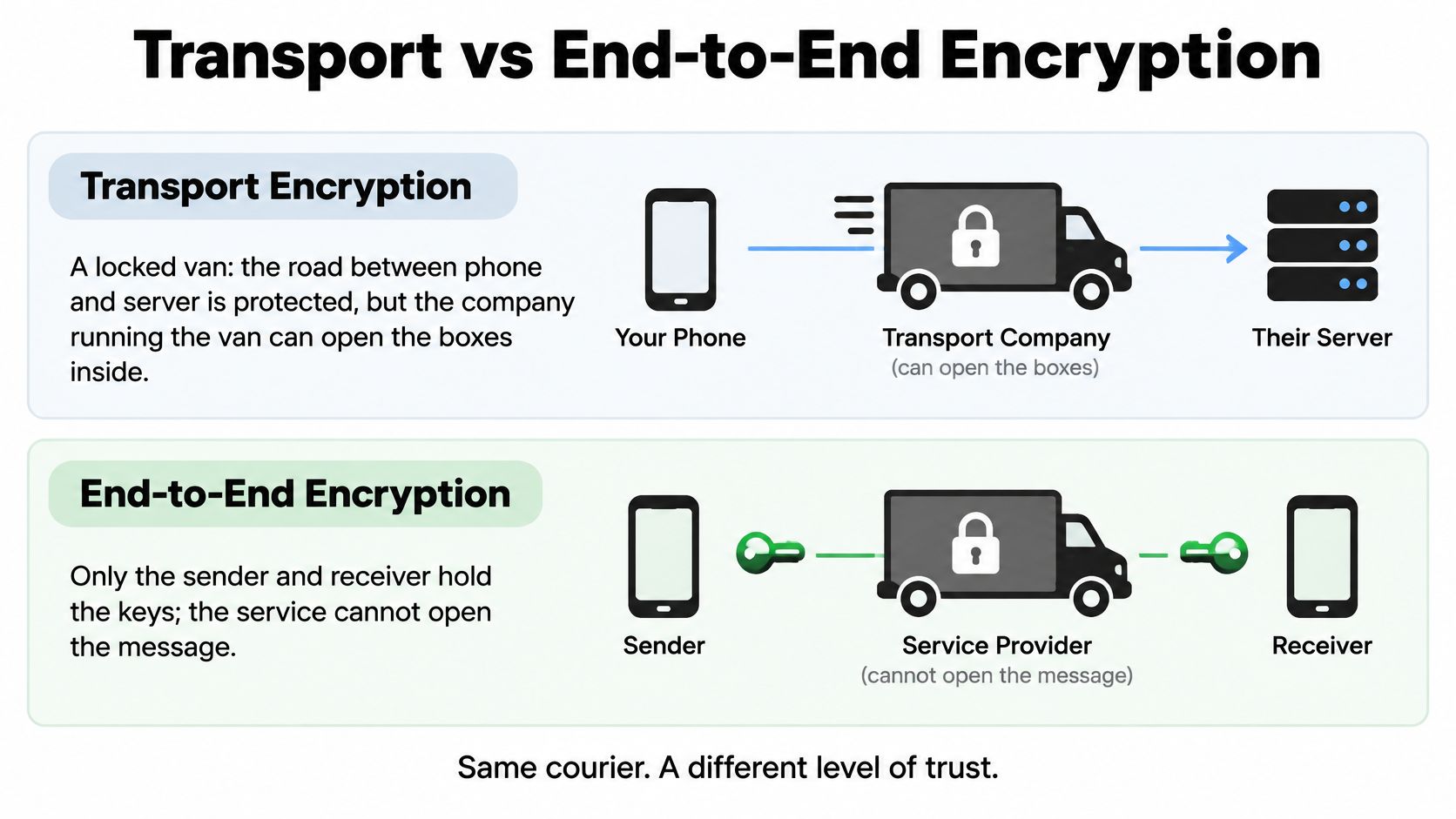
What the Server Can Read
Transport protection is essential, but it doesn't establish privacy from the service provider. NIST's mobile single-sign-on reference architecture requires TLS across participating communication channels, illustrating its role as a baseline network safeguard.
An app can therefore truthfully advertise encrypted traffic while still processing readable messages on its servers. For a fuller plain-language explanation, use this guide to what end-to-end encryption means.
The core distinctions are:
- Transport only: The connection is protected, but the provider may read content after it arrives.
- End-to-end protection: Only the authorized endpoints should be able to decrypt the conversation.
- Changing keys: Fresh message keys limit how much a particular key compromise can expose.
Why Strong Designs Change Keys
A permanent key would create a dangerous single point of failure. Ratcheting designs instead derive fresh keys as messages are exchanged.
A formal Universal Composability analysis of Signal's architecture examines X3DH for asynchronous initial key establishment and the Double Ratchet for ongoing messaging, including forward secrecy and recovery after temporary compromise. Recovery isn't automatic: the analysis makes it conditional on successful subsequent key exchanges and the security of the public-key infrastructure.
Forward secrecy means that compromising current device state doesn't automatically reveal previously delivered messages. It doesn't mean an attacker controlling an unlocked endpoint can't read what appears on its screen.
For an additional explanation of the encryption distinction, watch the video below.
Your practical test is simple: Does the documentation explicitly say the server cannot read conversation content? Check whether that statement covers calls, groups, attachments, and translation features, not merely typed messages.
For voice tools, audio and transcripts should be encrypted at the endpoints. If a translation backend must receive readable speech, that processing step needs its own explanation rather than being hidden behind a general encryption claim.
Metadata Leaks and Identity Checks
If the content is encrypted, what is still visible? Potentially enough to reveal a sensitive relationship, even without revealing what anyone said.
Consider a consultant contacting an acquisition adviser every evening. The wording may remain confidential while connection records still reveal a recurring relationship and its timing.
Look Beyond the Message Body
Ask whether the service collects or retains:
- Timing records: Timestamps, session duration, and communication frequency.
- Account identifiers: Phone numbers, participant identifiers, and device identifiers.
- Network information: IP addresses and connection records.
- Traffic patterns: Message sizes and repeated contact relationships.
Not every provider collects every field. Your task is to establish which records this provider handles, why it needs them, and when it deletes them.
An encrypted voice stream can still leave records at the infrastructure carrying it.
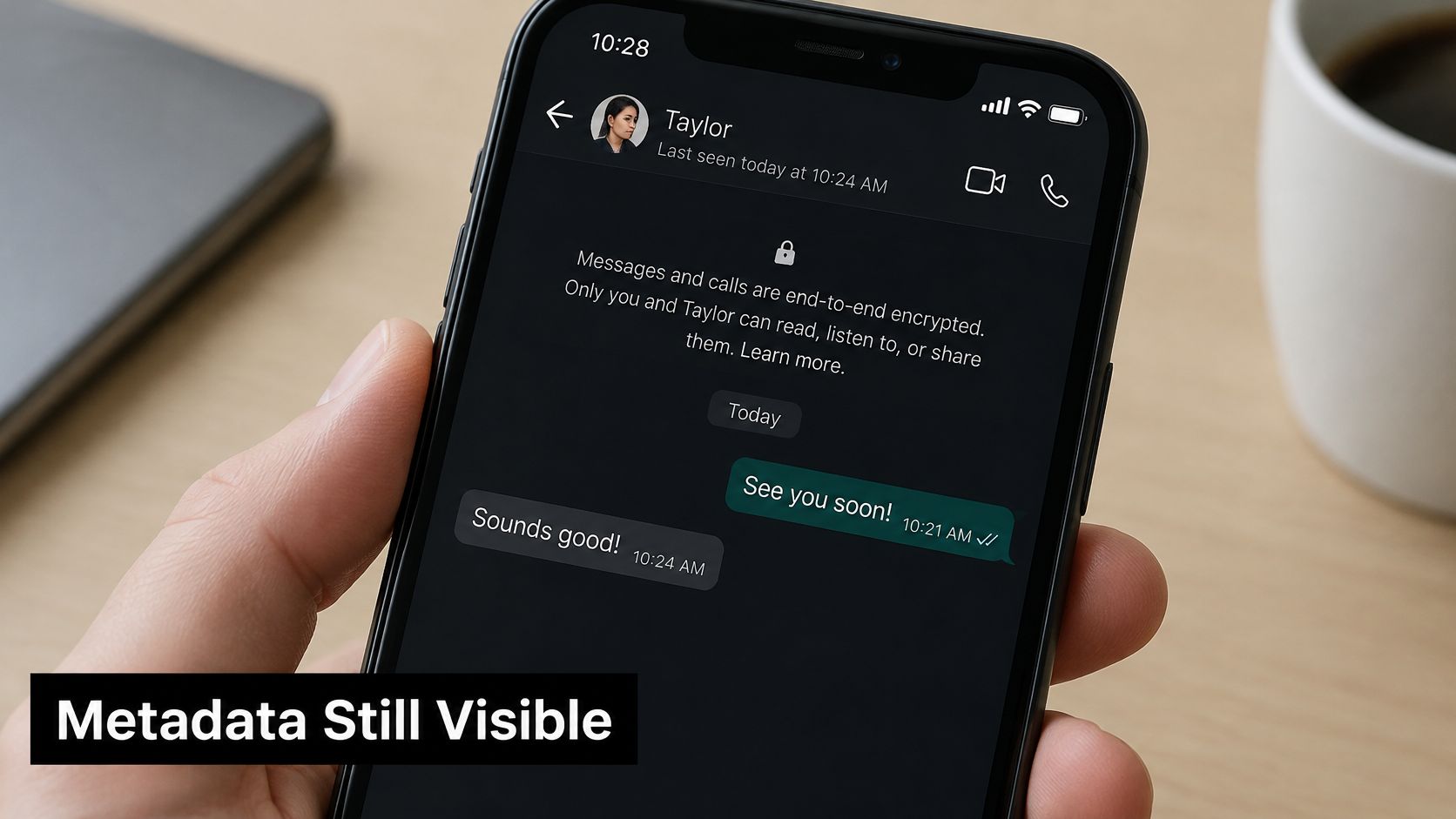
For a sensitive conversation, inspect the policy for call details and location-related information rather than assuming those records are absent. Prefer clear commitments to minimal logging, short-lived access tokens, protected temporary audio buffers, and defined deletion rules.
Verify the Person, Not Just the Connection
Encryption can establish a protected connection without establishing that the connection belongs to the person you intended to contact.
A 2024 formal analysis of Signal found that its modeled X3DH initialization did not satisfy the authors' strong-authentication property and could permit an unknown-key-share scenario; the proposed mitigation bound server-distributed key material to a signed identity. That's a finding about a particular model and authentication property, not proof that every Signal conversation is exposed.
The practical lesson is to use the app's contact-verification mechanism before sharing confidential information:
- Open the contact's security details. Find the safety number, security code, fingerprint, or verification QR code.
- Compare through a trusted route. Scan in person or compare through a separate channel whose ownership you've already established.
- Recheck after a device change. Investigate verification changes following a new phone, reinstall, or unexpected account activity.
Long hexadecimal fingerprints can be difficult to compare. A dissertation on the human aspects of secure messaging reports findings from 1,047 participants identifying usability and attack-detection weaknesses in conventional hexadecimal verification.
If you don't share a language, agree on the method before discussing sensitive topics. Scanning a QR code in person avoids reading long strings aloud; a separately confirmed phrase can help establish continuity, but it doesn't replace cryptographic verification.
A familiar profile photo isn't an identity check.
Evaluate content confidentiality, impersonation, replay or unknown-key-share attacks, and metadata leakage as separate questions. No single padlock answers all of them.
Audits, Open Source and Compliance Explained
An app's security page may display an audit badge, an open-source label, and a compliance statement together. They describe different kinds of evidence, and none guarantees that your particular conversation is safe.
Open source means the published code is available for inspection. An audit means reviewers examined a defined scope against stated criteria. Public code isn't automatically audited, and an audit report isn't automatically public.
Read the Scope Behind the Badge
A useful third-party audit identifies the reviewer, the components tested, the release examined, and the findings. It should also explain whether the developer fixed the problems and whether reviewers checked those fixes.
Compare these kinds of evidence:
| Evidence | What it helps establish | What it doesn't establish alone |
|---|---|---|
| Public source code | People can inspect the published implementation | The installed app matches that code |
| Independent audit report | Reviewers tested a specified scope | Every feature and later release is covered |
| Compliance statement | The provider claims defined data-handling obligations | The provider cannot read your messages |
For public code, look for build instructions and a clear release process connecting the repository to the app you install. For an audit, check whether translation processing, storage, backups, and account recovery fall inside its scope.
A protocol-only review leaves different questions unanswered from a review of the complete mobile application.
Separate Legal Obligations From Technical Protection
Compliance concerns rules for handling personal information. Data-protection laws such as GDPR address collection, storage, use, and deletion; cross-border processing also needs an explanation appropriate to the applicable jurisdiction.
Treat a compliance claim as a starting point. Look for the responsible company, applicable jurisdiction, processing regions, subprocessors, and a usable route for privacy requests.
Evidence standard: Prefer a scoped report with disclosed limitations over an impressive adjective without supporting documentation.
An app that publishes a relevant audit, identifies processing regions, and explains deletion gives you concrete material to evaluate. A military-themed encryption slogan doesn't answer those questions.
Keep the report and policy beside the app's settings while evaluating it. If the documentation describes controls you can't find or a release you aren't using, record that gap instead of assuming the claim applies.
Evaluation Checklist Before You Trust an App
Use this checklist before installing an app for sensitive conversations. Mark each row as pass, fail, or unanswered, and save the documentation supporting your decision.
NIST's mobile-app vetting guidance recommends evaluating applications against defined security requirements and protecting authentication keys from easily accessible, unencrypted plain-text storage. That's a more useful standard than accepting a security slogan.
Apply the Pass-or-Fail Checks
Pass-or-fail checks for a secure communication app
| Check | What to verify | Red flag |
|---|---|---|
| End-to-end encryption by default | Enabled for all one-to-one and group chats without a setting | Encryption optional or off in some chats |
| Encryption in transit | TLS on all network traffic, stated in documentation | Plain HTTP or no statement on traffic protection |
| Identity verification | Safety numbers, QR codes, or fingerprints to confirm contacts | No way to verify the other person |
| Audits and open source | Published third-party audit or public source code | Security claims with no audit or code |
| Credential and key storage | Keys stored protected, not in plain-text files | No information on key handling |
| Metadata and logging | Minimal logging; clear policy on phone numbers and IP addresses | Vague data retention language |
| Account security | Multifactor authentication supported for account login where applicable | Password-only login |
| Deletion and backups | Stated deletion timelines and encrypted backups | Backups or deletion not mentioned |
| Compliance and data location | Stated compliance with GDPR or applicable equivalent, with data region disclosed | No stated jurisdiction or data location |
Treat a red flag as a reason to pause installation for sensitive use, not as proof that the app is malicious. Missing evidence and demonstrated insecurity aren't identical, but neither supports trusting an app with confidential documents.
Start with encryption and identity because they establish the basic protected conversation. Then check the audit or code evidence, credential handling, and account access before assessing the records and copies left behind.
Score According to the Conversation's Risk
For confidential messaging, drop a candidate that fails default end-to-end encryption or contact verification. Don't compensate for either failure by adding up unrelated conveniences.
Use the remaining rows as requirements, not popularity points:
- Pass: You found a clear, relevant statement or setting and understand its limits.
- Unanswered: You couldn't establish the protection. Keep sensitive information off the service.
- Fail: The documented behavior conflicts with your needs. Choose another tool or restrict the use case.
Weak logging or backup disclosure may be tolerable for a low-risk exchange, such as asking about opening hours. It isn't a reasonable compromise for identity documents, client information, or private legal discussions.
A translation utility may serve a different purpose from a confidential messenger. When comparing a free translation app, establish its processing path rather than assuming that useful translation features imply private message delivery.
Finally, read the privacy policy against audits and open source and metadata and logging. The policy won't substitute for an audit, but it can expose inconsistencies between technical promises and the data the company says it collects.
Privacy Questions to Ask About Live Voice Translation
A translated sentence can create several data objects. You speak, a microphone captures audio, software recognizes words, a translation system generates the target language, and a device plays the result to your partner.
That path may also produce temporary buffers, transcripts, logs, or saved conversation history. A 2025 systematic review of messaging privacy notes that encrypted content can coexist with revealing metadata and potentially unencrypted device storage.
Follow the Sentence Through Processing
Before a sensitive multilingual conversation, establish:
- Processing location: Does speech recognition and translation happen on-device, in the cloud, or through a combination?
- Stored copies: Are raw audio, transcripts, translations, or diagnostic records saved?
- Retention and deletion: How long does each copy remain, and can you request deletion?
- Other uses: Can conversation content be used for improvement or training, and are opt-outs available?
- Device exposure: What remains on a lost phone, a connected earbud, or a linked device?
- Partner control: Does the other person's device retain a transcript or allow recording?
Ask your partner before enabling transcription or saving audio. Receiving translated speech doesn't necessarily mean they've agreed to retain a written record.
The workflow matters as much as the feature list when evaluating a live voice translation app. Test with an ordinary sentence before discussing financial, medical, or professional details.
Where Translate AI Fits
Our app gives instant voice translations in over 80 languages. We translate both ways: you speak in your language and your partner hears it in theirs, with compatibility for most AirPods and earbuds.
You can find the App Store listing and visit our website to review the product. Those conversation features don't, by themselves, establish end-to-end encryption or a particular retention policy.
Before sensitive talks, read the app's privacy policy for processing and storage details. Apply the transport-versus-end-to-end test, then run the evaluation checklist, especially the questions about readable server processing, temporary audio, and saved transcripts.
Match Your Setup and Pick the App
A traveler at a train station needs a plan for a missing phone. A consultant joining a client call needs confidence in the participant's identity, while a language learner recording practice needs control over audio storage.
Choose according to the information you could lose, not just the feature you'll use most.
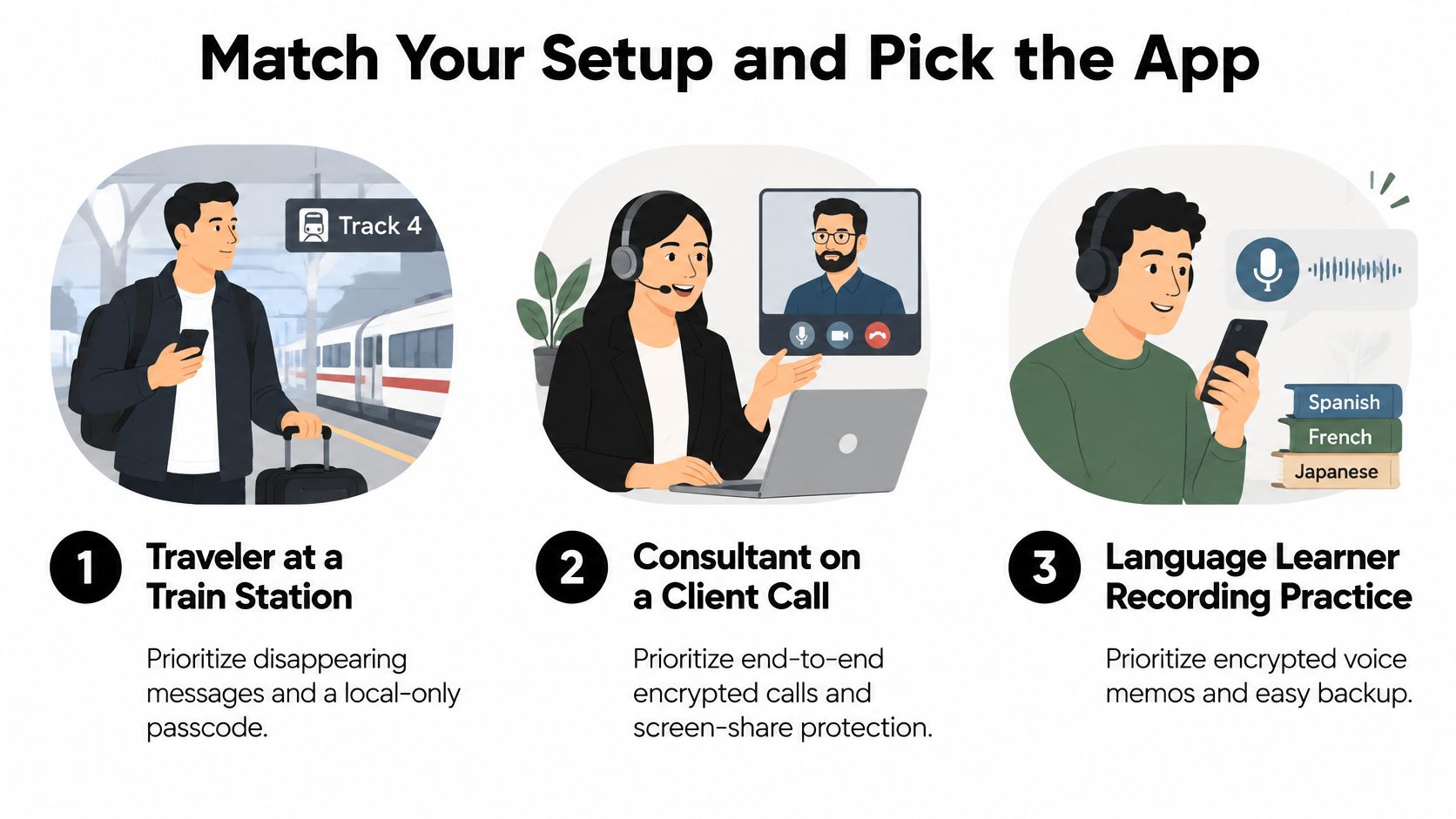
Top privacy priority by situation
| Situation | Top priority | Setting to check |
|---|---|---|
| Traveler on roaming or public Wi-Fi | Encrypted traffic and lost-phone protection | Device lock, auto-delete, encrypted backups |
| Professional in confidential meetings | Verified contacts and limited transcript retention | Safety number check, retention settings |
| Language learner practicing aloud | Storage of voice practice recordings | Recording deletion and data use opt-outs where offered |
| Shared or family device | Local storage and notification privacy | Disappearing messages, hidden notification previews |
Travelers should keep a backup contact channel and avoid sensitive exchanges over unfamiliar public Wi-Fi where possible. Professionals should keep confidential topics off shared devices; learners should delete practice recordings after sessions when they don't need them.
Protect Access and Define Your Threats
CISA's phishing infographic reports that 8 out of 10 organizations in its assessment sample had at least one person fall victim to a phishing attempt. Enable phishing-resistant multifactor authentication wherever available, and confirm urgent requests for codes, links, or sensitive information through a separate channel.
Ask yourself who might want your conversations: criminals, employers, family members, or border staff. Then identify what would hurt most if exposed and where your devices could end up, including hotel rooms, shared computers, or lost bags.
- Write down your top threats. Prioritize device loss, impersonation, or retained audio according to your situation.
- Run the checklist. Require evidence for the protections those threats demand.
- Verify a key contact. Complete the app's verification before confidential discussion.
- Test a low-stakes chat across different networks. Check that the workflow and security indicators remain understandable.
- Set device, backup, and deletion rules. Include linked devices and notification previews.
Our app is designed for travel, work, and everyday chats, but your conversation's sensitivity should determine what you share. Choose the tool that passes the checks your threats require, and repeat the review after major updates.
Translate AI offers two-way live voice translation so you and your conversation partner can speak in your own languages. Visit Translate AI to explore the app, then review its privacy policy and test a low-stakes conversation before sharing sensitive information.