

What Is End to End Encryption? a Plain-English Guide
You're on airport Wi-Fi, messaging your hotel about a late arrival. Before sending your booking details, you pause: can the airport, the internet provider, or the messaging company read them?
The answer depends on more than whether the app displays a padlock. Understanding what is end to end encryption helps you choose a safer channel, recognize what remains exposed, and check an app's privacy claims before sharing something sensitive.
What End-to-End Encryption Means in Plain Language
End-to-end encryption (E2EE) scrambles a message on the sender's device, keeps it scrambled through the networks and servers in between, and unscrambles it only on the intended recipient's device. The National Institute of Standards and Technology defines this protection while noting that routing information remains visible.
Think of your hotel message as a locked box. A courier delivers it, but only the people at either end have the means to open it. The courier can see a delivery taking place and where it's going, without reading the note inside.
Keep these roles separate:
- Sender: Your phone prepares and encrypts the message.
- Carrier: Networks and servers move the encrypted content.
- Recipient: The hotel's intended device decrypts it.
This map shows the boundary between your conversation and its carriers.
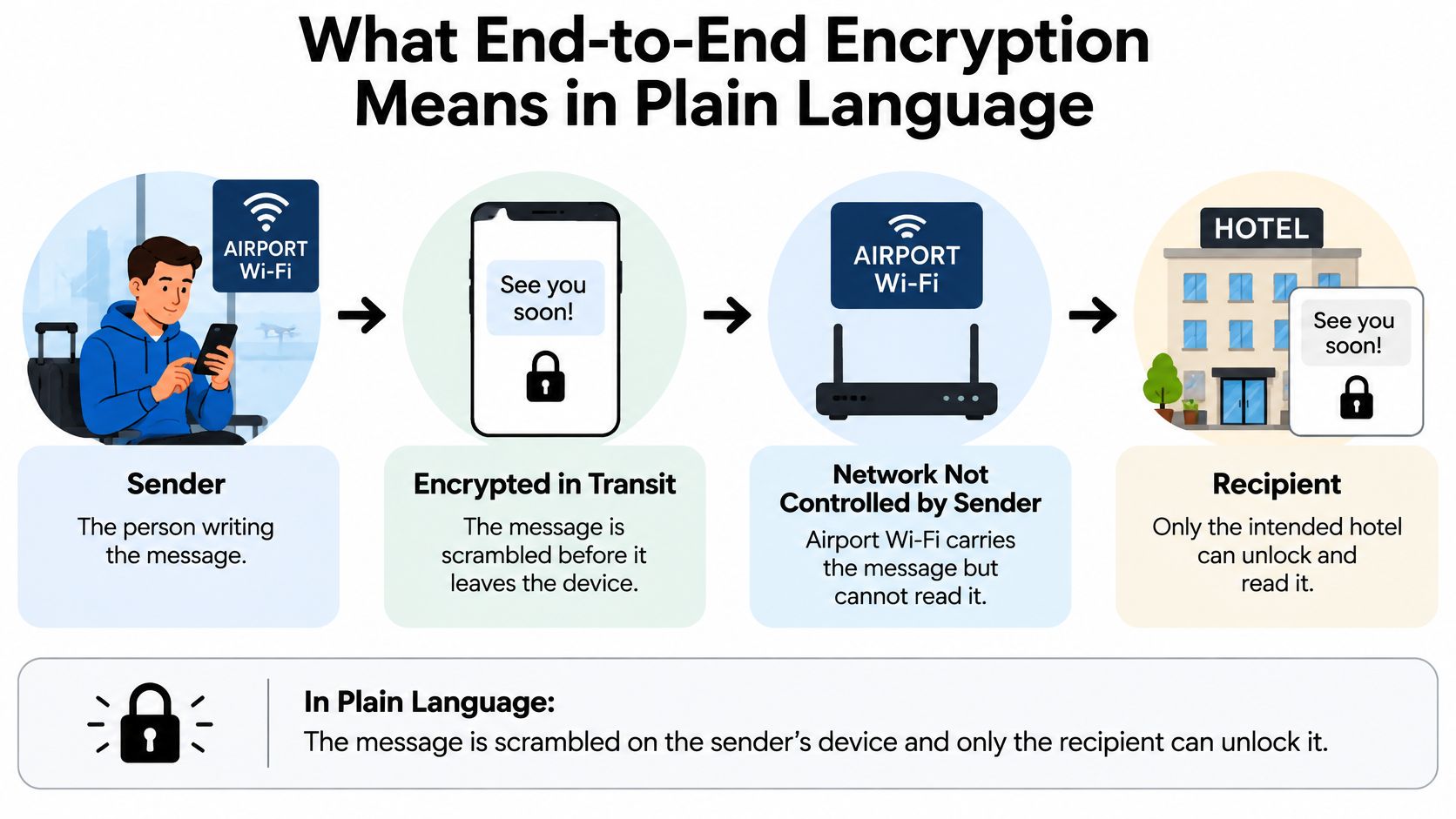
WhatsApp completed its default E2EE rollout for messages, calls, and other communications in 2016, as described in the Signal Protocol overview. You may already use this protection without switching anything on.
That doesn't make every conversation detail invisible or protect an open or infected phone. Ciphar's explanation of the limits of end-to-end encryption offers useful context for separating content protection from broader privacy.
Explain-it-back test: Can you tell a friend, in two sentences, where encryption begins and who can unlock the message?
The essential flow is: sender device → encrypted message → network and servers → recipient device.
How Keys Lock and Unlock Each Message
Encryption keys aren't passwords you type into every chat. They're cryptographic values that your app uses behind the scenes to establish a protected conversation.
This video provides a visual companion to the message journey.
The Message Journey
The following is a simplified model. Actual protocols derive several kinds of keys rather than using the same secret directly for everything.
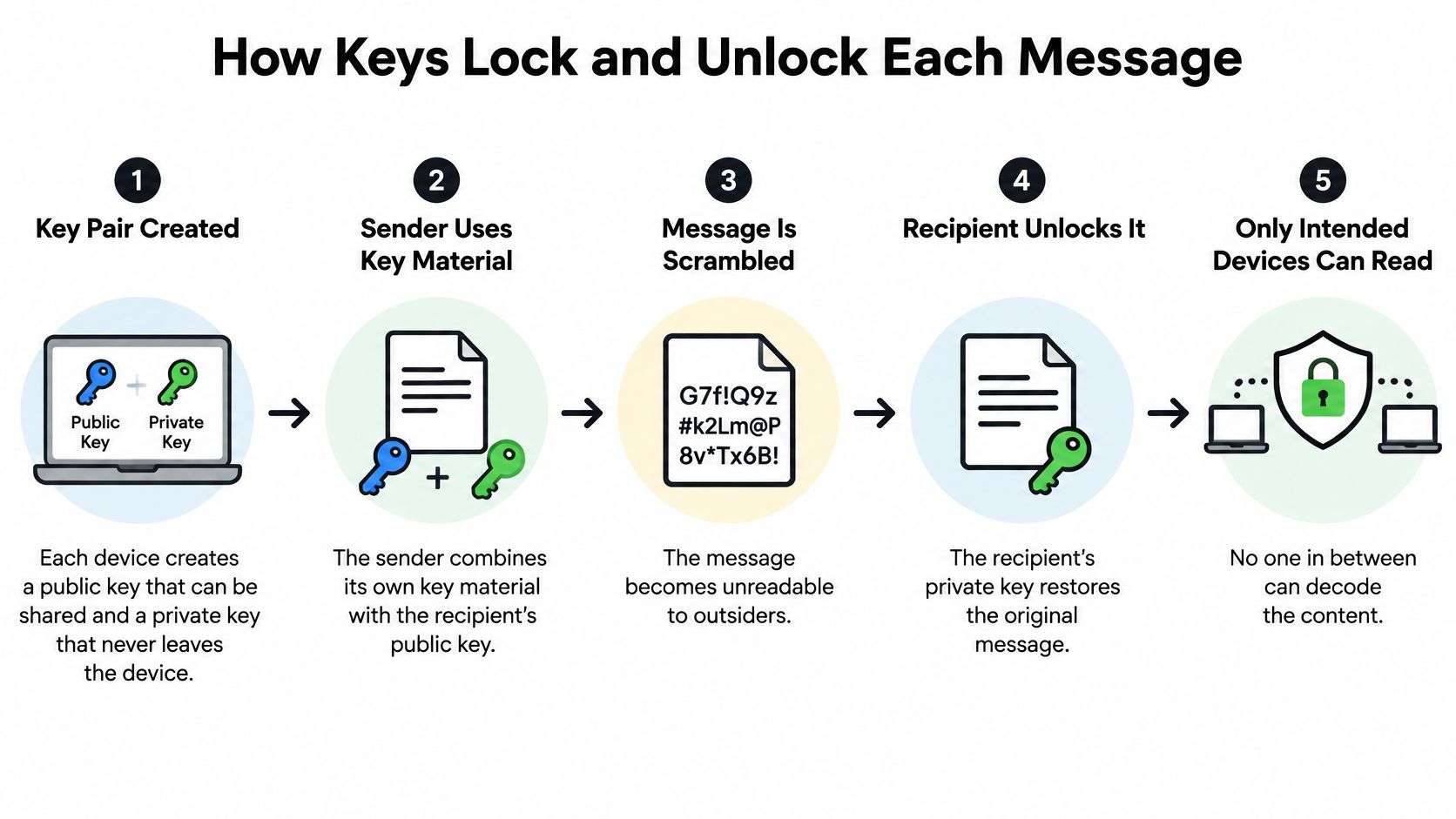
- Create device keys: Each device generates a public key it can share and a private key it keeps secret on the device.
- Agree on a secret: The sender combines its own key material with the recipient's public key to derive a shared secret, from which message keys are generated.
- Encrypt the content: The sender's app converts the readable message into ciphertext, the scrambled content sent across the network.
- Relay the ciphertext: Servers deliver or temporarily store the encrypted message without possessing the endpoint secrets needed to read it.
- Decrypt at the destination: The recipient's device uses its private key material to derive the matching message key and recover the original content.
Why the Keys Keep Changing
A well-designed conversation doesn't rely on a permanent key for every message. According to Signal's protocol documentation, its Double Ratchet derives a fresh message key for each message and periodically mixes new Diffie–Hellman key material into the process.
Think of each message having its own padlock, with the spare-key arrangements changing as the chat continues. Forward secrecy means a current key compromise doesn't automatically expose earlier messages. Post-compromise security can limit later exposure after recovery and fresh key updates, but it can't rescue a phone an attacker still controls.
Also examine chat restoration. If a provider can restore your entire history without a secret, recovery method, or trusted device you control, investigate how it decrypts that history. This is a warning sign, not conclusive proof: some services securely transfer keys between your devices.
The diagram summarizes the key exchange and delivery process.
How E2EE Compares With Other Encryption Types
Who holds the key? That question distinguishes protections that otherwise sound interchangeable.
Encryption types compared by what they protect and who can read it
| Encryption Type | What It Protects | Who Can Read the Content | Typical Example |
|---|---|---|---|
| Transport encryption (HTTPS, TLS) | Data between your device and a server | The service provider, which decrypts to process it | Online banking and web forms |
| Encryption at rest | Stored files and databases on drives or servers | Whoever holds the decryption keys, often the provider | Encrypted cloud photo libraries |
| Disk encryption | Everything on a lost or stolen device | Someone with the device passcode or another authorized unlock method | Full-disk encryption on phones and laptops |
| End-to-end encryption | Message content from sender device to recipient device | Only the sender and intended recipients | Signal chats and WhatsApp messages |
Your bank website needs to process your payment instructions. Transport encryption protects their journey to the bank, without preventing the bank from reading them.
An encrypted cloud photo library protects stored files against access without the storage keys. If the provider manages those keys, that protection doesn't necessarily exclude the provider.
Match the Protection to the Task
Disk encryption helps when you leave a locked laptop in a taxi. It's a form of at-rest protection, not a substitute for protecting messages after you send them.
E2EE serves a different purpose: keeping the communication provider outside the content-reading boundary. For a confidential supplier discussion, choose a channel that provides that boundary rather than relying on a secure-looking website.
A secure web form can be appropriate when the service itself must receive the information. For private person-to-person messages, ask whether the provider can technically decrypt stored content. If it can, those messages aren't protected end to end from that provider.
Everyday Places Where E2EE Protects You
You send family abroad an update about a personal disagreement and want the conversation to stay between participants. E2EE can protect that exchange from the companies carrying it.
A purchasing manager discusses a draft price with an overseas supplier before either business announces the deal. A patient sends a health document, or a client shares a legal attachment, through an appropriately configured encrypted messaging channel.
Conversations Beyond Text
During an international voice call, E2EE can protect the audio exchanged between participants. In a live translated conversation involving phones and earbuds, the important question is whether every processing step stays within the intended security boundary, not whether the original call is encrypted.
Say a tour guide sends a meeting location while you're using café Wi-Fi abroad. An end-to-end encrypted channel lets the network carry the update without needing access to its contents.
These situations involve different devices, but the same need: keeping intermediaries out of private content.
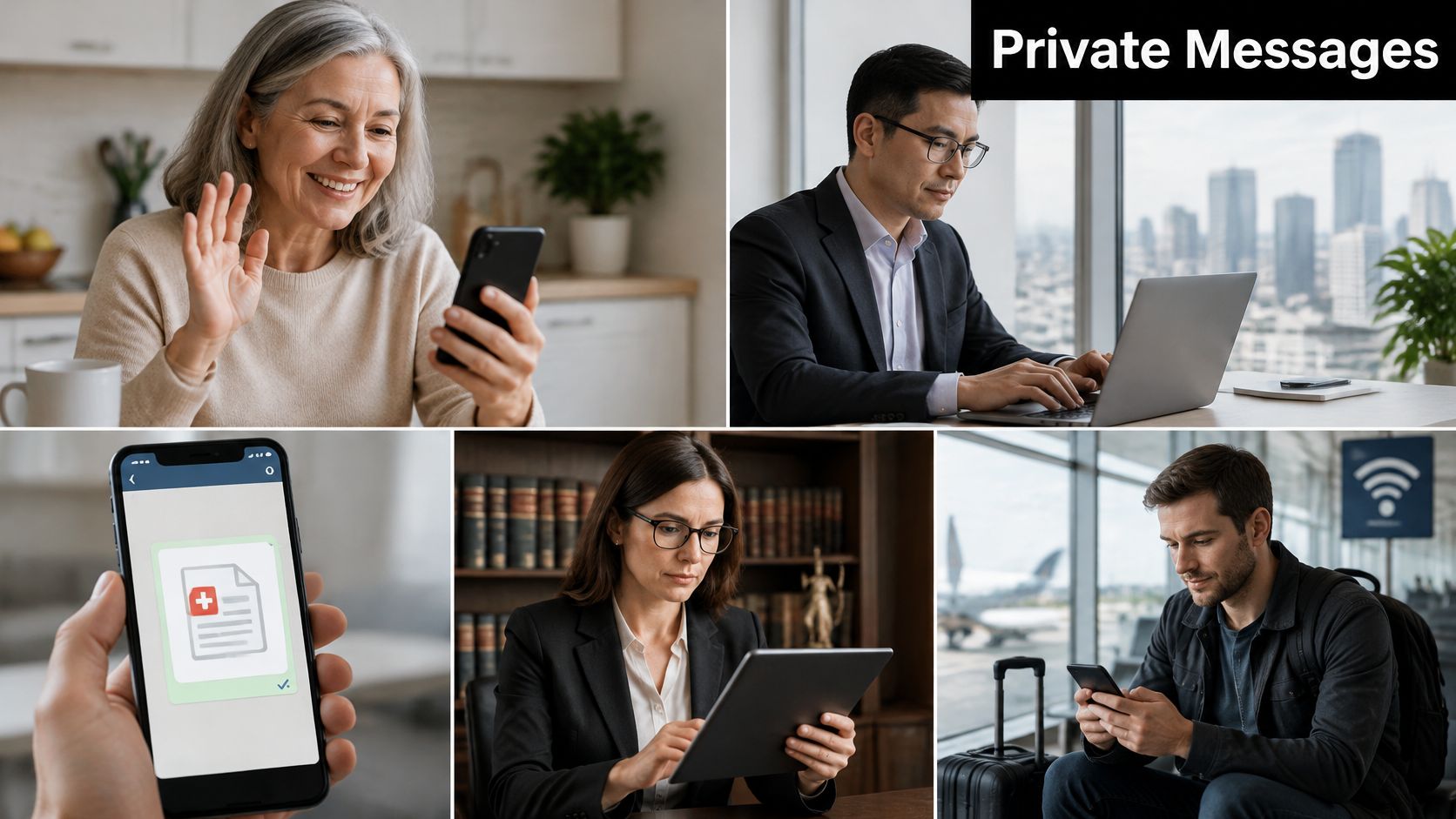
People who particularly benefit include:
- International travelers coordinating plans on unfamiliar networks.
- Expats managing personal affairs across borders.
- Cross-border teams discussing confidential work.
- Journalists communicating with sensitive contacts.
- Clinics and law offices exchanging private details through approved channels.
Both endpoints still need to be trusted. Sending securely to the wrong person, or to a phone someone else can freely open, defeats the purpose.
List the three sensitive conversations you expect to have this month. For each, identify the channel and check whether its protection matches what you're sharing.
What E2EE Cannot Hide and the Myths That Hide It
E2EE protects message content, not the whole conversation. Metadata includes who contacted whom, when, from which account or device, and sometimes where.
The Electronic Frontier Foundation warns that metadata can reveal relationships, timing, and location even when message text remains encrypted.
What E2EE protects and what it leaves exposed
| Element | Protected by E2EE? | Why It Matters |
|---|---|---|
| Message text and voice content in transit | Yes | Intermediaries and servers cannot read it |
| Who contacted whom and when (metadata) | No | Routing and timing can remain visible to networks and providers |
| Lock-screen notification previews | Often no | Some apps pass sender or message details to notification services |
| Cloud or provider-hosted backups | Only if separately encrypted | A readable backup can expose the history |
| Screenshots and recipient devices | No | Recipients can copy, forward, or share content |
| Unlocked or infected phone | No | Content is accessible before encryption or after decryption |
A 2024 study of 21 secure messaging apps found that 11 leaked metadata to push-notification services, according to the researchers described by Security Scientist. Check notification handling as well as whether your lock screen displays names or message text.
A provider-hosted backup needs separate protection. Likewise, malware and screenshots access readable content outside the encrypted delivery process.
Myth 1: E2EE means nobody can ever access my chats.
Participants' devices contain readable content. A compromised endpoint remains a weak point.
Myth 2: Governments can never see encrypted messages.
Authorities may obtain metadata, accessible backups, or device access without breaking the message encryption.
Before sharing, ask:
- Scope: What exactly is encrypted?
- Destination: Where is it decrypted?
- Retention: Is any audio, transcript, backup, or log kept afterward?
E2EE protects content between intended endpoints. It doesn't guarantee anonymity, safe devices, or control over what a recipient keeps.
How to Verify E2EE in Your Apps
A privacy slogan isn't enough. Check the particular conversation, the devices attached to your account, and the settings that create extra copies.
Check the Claim and the Settings
- Find the explicit label. Open the app's privacy or security settings and look for end-to-end encryption, not just encryption or secure messaging.
- Compare the privacy policy. Look for an explanation of who holds the keys and whether the provider can access content; unexplained wording leaves an important question unanswered.
- Verify the safety number. In the chat's contact information, compare the safety number or security code with your contact in person or through another trusted channel; the identity-key verification guidance accompanying Signal's Double Ratchet specification supports this check for sensitive conversations.
- Review linked devices. Sign out unfamiliar laptops, browsers, and tablets so an old session doesn't retain access.
- Enable encrypted backups. If the app offers them, activate that protection and store its recovery key separately from your phone; otherwise consider disabling chat backups.
- Hide lock-screen previews. Turn off sensitive message previews in the app or your phone's notification settings to reduce casual exposure.
Don't treat a missing setting as proof that protection is active. If the documentation doesn't clearly cover calls, attachments, group chats, and backups, ask the provider before relying on it for confidential material.
Practical rule: Choose a less sensitive test conversation while you inspect settings. Don't discover the limits after sending the document.
Using Translate AI Securely
Translate AI is a live voice translation app for 80+ languages, with two-way conversation, compatibility with most AirPods and earbuds, and speaker mode for hands-free chats. Those features describe how people communicate, not proof of end-to-end encryption.
Before using it for sensitive talks, read its privacy policy and confirm what audio is processed, where processing happens, and what gets stored. Look specifically for information about recordings, temporary audio, transcripts, diagnostics, and deletion controls.
Avoid saving transcripts of private conversations unless everyone agrees and you have a clear reason to retain them. Don't assume encryption of an underlying call also covers translation logs or any separate speech-processing service.
For a confidential business or medical discussion, use an organization-approved workflow if the available documentation doesn't answer those questions.
Check Privacy and Legal Limits Before Sharing Sensitive Information
Encryption rules and access restrictions differ across countries. In 2024, end-to-end encrypted services were blocked in at least 17 of the 72 countries assessed, according to Freedom House's 2025 report, so an app that works at home may be unavailable abroad.
E2EE doesn't prevent lawful device seizure, subpoenas for provider records, or requests for available metadata. Workplace rules may also govern message retention, storage locations, and approved communication tools.
Before You Share
- Confirm this chat's protection. Make sure E2EE applies to the specific conversation.
- Check backup encryption. Include copies outside the main chat.
- Check local restrictions. Confirm whether the service is restricted where you're traveling.
- Verify the recipient. Compare the contact's identity code through a trusted channel.
- Get recording consent. Ask before recording or retaining a translated conversation, and check applicable notice requirements.
- Choose the proper channel. Decide whether the content belongs in chat or requires an approved formal channel and contractual safeguards.
For cross-language security conversations, a guide to how to say contraseña in English can help you discuss passwords clearly. Never share an actual password just to clarify the term.
A technically secure channel isn't automatically an appropriate channel for every document or decision.
The right choice depends on the content's sensitivity and the laws where each person sits. Take case-specific legal questions to a qualified lawyer.
Frequently Asked Questions About End-to-End Encryption
Does a VPN make my messages end-to-end encrypted?
No. A VPN encrypts the connection to the VPN provider, which can observe some traffic information, but it doesn't automatically expose content protected by HTTPS or E2EE. Only the messaging app's own E2EE establishes content protection between the communicating devices.
Is email end-to-end encrypted by default?
Usually not. Ordinary email commonly uses transport encryption, while providers can access stored content unless a separate end-to-end encryption system is used.
Do group chats keep E2EE?
They can, provided the app supports it for that group. Every member adds another device and another person who can expose the conversation, so review membership before sharing confidential material.
Why do people misunderstand E2EE?
A 2025 survey of roughly 700 adults each in the United States, United Kingdom, France, and Germany found strong support for encryption, yet more than one-third of U.S. respondents who considered E2EE very important couldn't correctly identify who could access messages, according to Proton's encryption survey. The distinction between protecting delivery and protecting every copy of a conversation is easy to miss.
Can I trust a service that claims E2EE without checking?
Not fully. Use the settings, identity verification, linked-device, and backup checks before relying on the claim, and seek clear documentation when the provider's wording is ambiguous.
Translate AI offers live two-way voice translation for travel, work, and everyday conversations, with earbud support and a hands-free speaker mode. Visit Translate AI to explore its features, and review its privacy practices before using it for sensitive discussions.