

Your Practical Guide to Audio English to German Translation
Stuck trying to order a Schnitzel in a busy Berlin restaurant? Worried you'll miss a crucial detail in a business meeting in Frankfurt? Fumbling with clunky phrasebooks or slow typing apps kills the natural flow of conversation and leaves you feeling isolated. This guide is your solution.
Our goal is simple: to give you specific, actionable advice so you can use modern audio translation tools to have smooth, confident conversations in German. We'll show you how to choose the right app, master a few simple techniques, and turn awkward encounters into genuine connections.
Why Instant Audio Translation is Essential in Germany
Whether you're backpacking or sealing a deal, communication is everything. While many Germans speak excellent English, relying on it can limit your experiences. The real magic happens when you can bridge the language gap yourself, turning potential confusion into real understanding.
The need is huge. Germany is Europe's powerhouse in the translation industry, with a language software market valued at a massive 5.4 billion USD. In a country where over 95 million people speak German, having a reliable translator in your pocket is essential.
The Problem: Traditional Methods Are Awkward
Let's face it: stopping to type or flip through a book creates unnatural pauses that kill the momentum of any real conversation. They simply can't keep up with the speed and nuance of a live chat.
This is where dedicated audio English to German translation apps change the game. They are built for the back-and-forth of a live discussion, whether you’re asking for directions in Munich or clarifying contract details in Hamburg.
Here's the specific, actionable advice on how they solve common problems:
- Problem: Awkward delays. Solution: Instant translation of spoken words eliminates the painful pauses that make conversations feel stilted.
- Problem: Literal, unnatural translations. Solution: Modern AI understands the meaning behind your words, providing far more natural and accurate results.
- Problem: Lack of privacy. Solution: Using earbuds allows for discreet, seamless conversations—a game-changer in professional settings or crowded public spaces. Learn more in our guide on real-time language translator earbuds.
Mastering audio translation isn't just about understanding words. It’s about building relationships, closing deals, and experiencing German culture on a deeper level. This guide will walk you through the practical steps to make that happen.
Choose Your Go-To Translation Toolkit
When you’re lost in a Berlin train station, a basic text translator that's great for reading menus won't help you in a fast-paced conversation. For a real, flowing dialogue, you need a tool specifically built for the speed of spoken words.
The tools designed for audio English to German translation are in a different league. They are engineered to handle the natural back-and-forth of a chat, interpreting continuous speech without making you stop and type every sentence.
Actionable Advice: What to Look For in a Live Translation App
Picking the right app is your most important decision. The market is crowded, but only a few are truly up to the task of a live, spoken exchange. Use this checklist to find the best one for your needs.
| Feature | Why It Matters for You | Actionable Tip |
|---|---|---|
| Two-Way Dialogue Mode | This is the core of a real conversation. It lets you and a German speaker talk naturally while the app translates for both of you. | Look for an interface with two mic buttons or an auto-detect mode. Avoid clunky, turn-based apps that slow you down. |
| Low Latency | Long delays kill the rhythm of a chat. You need the translation to appear almost instantly, ideally in under a second or two. | Check app reviews for mentions of "lag" or "delay." Test it yourself; a good app feels responsive and fast. |
| High Accent Sensitivity | The AI needs to understand you, whether you have a Texas drawl or a Scottish brogue. Poor accent recognition leads to frustrating errors. | Before you rely on it, test the app with a few tricky phrases. See if it handles your unique speed and inflections. |
| Clear User Interface | In the middle of a conversation, you don't have time to hunt for buttons. The app must be incredibly simple and intuitive under pressure. | Look for large, easy-to-tap icons and clear visual cues. The less you have to think about the app, the better. |
A great translation app feels invisible. It’s a bridge, not a clunky gadget you're constantly fussing with. For a deeper dive, check out our guide to the best translation apps for travel in 2025.
Your Essential Hardware Setup: Quick and Easy
Your smartphone is the brain, but your earbuds are what make it all work smoothly. The good news? You don't need expensive equipment. Your everyday Bluetooth earbuds are perfect.
Here’s your simple, actionable hardware checklist:
- Pair Your Earbuds First: Do this before you need it. Go to your phone's Bluetooth settings and connect your earbuds.
- Do a Quick Mic Check: Open your translation app and say, "Hello, can you hear me?" Make sure the app uses your earbud’s microphone, not your phone's.
- Confirm App Permissions: Go to your phone’s settings, find the app, and ensure it has permission to use your microphone and Bluetooth. This is a common and easily fixed problem.
Taking five minutes to test this at home saves you from fumbling with tech when you’re trying to connect with someone.
How to Have Seamless Conversations with Translate AI
When you need to translate spoken English to German in real time, you need a tool that just works. Translate AI is a standout choice because it's built specifically for natural, two-way dialogue, helping conversations flow without awkward pauses.
A huge plus is its universal compatibility. Translate AI works with any standard earbuds, which means you don't need to buy specialized hardware. You can just use the same earbuds you already have for music or calls.
Get Started in Three Simple Steps
The setup is quick and painless, getting you from download to conversation in moments.
- Download and Launch: Grab Translate AI from the app store and open it.
- Pick Your Languages: Set English as your language and German as the language to translate to.
- Start Talking: Tap the microphone icon and begin your conversation.
This is the clean, straightforward interface you'll see.
The design focuses on ease of use—large, clear language selectors and a massive microphone button so you can start translating immediately.
Powerful Features for Real-World Use
Translate AI offers a hands-free speaker mode, perfect for group settings like a business meeting or a dinner with new friends, where passing a phone back and forth would feel clunky.
The app's accuracy is powered by context-aware AI. In plain English, that means it doesn't just translate words—it understands the meaning behind your phrases. This leads to much more natural and reliable translations.
By focusing on simplicity, compatibility, and accuracy, Translate AI gets the technology out of the way so you can focus on the conversation. You can learn more and download the app directly from the Translate AI App Store page.
Getting the Hang of Real-Time Translation
Having a powerful translation app is one thing, but using it in a live conversation is a skill. Your success with audio English to German translation comes down to mastering two key workflows. Get these right, and the tech fades into the background.
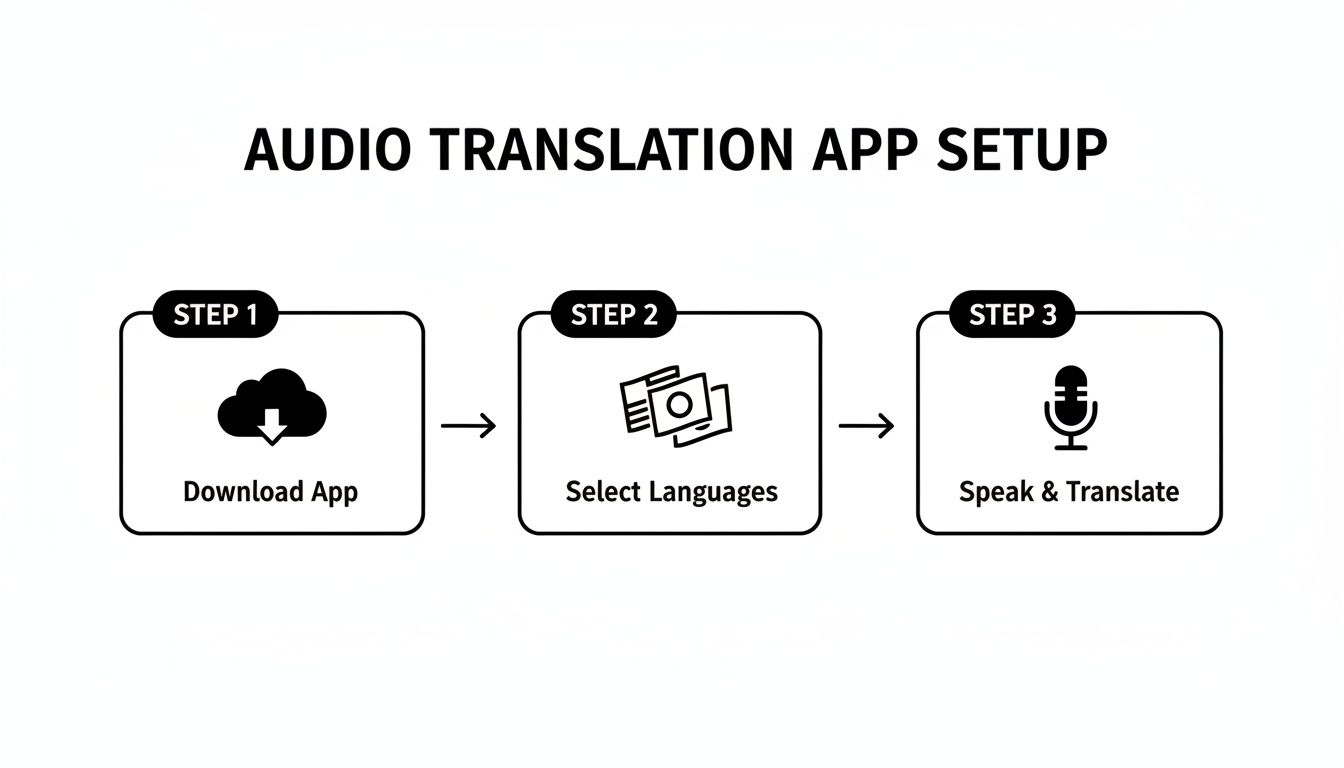
As you can see, getting started is designed to be simple: grab the app, pick your languages, and you're ready to talk.
Workflow 1: Two-Way Dialogue for Personal Chats
This is your go-to method for everyday interactions—checking into a hotel, ordering coffee, or chatting with a new friend. The goal is a private, seamless conversation where the technology feels invisible.
Here’s an actionable step-by-step for a hotel check-in:
- Signal your intent. Catch the clerk's eye and point to your earbud. A simple, friendly gesture signals you're using a translation tool.
- Speak your part. Tap the microphone icon and ask your question clearly: "Hello, I have a reservation under the name Smith."
- Listen to the translation. You'll hear the German translation discreetly in your earbud, letting you maintain eye contact.
- Pass the phone. Offer your phone to the clerk so they can speak their reply. The app translates their German response back into English for you.
Actionable Tip: Keep your sentences short and pause briefly after each one. This gives the app a clean audio clip to process, dramatically boosting accuracy and cutting down on lag.
Workflow 2: Speaker Mode for Group Settings
Passing a phone around a business lunch would be clumsy. That's where speaker mode saves the day.
Imagine you're at a business dinner in Frankfurt. Here's what to do:
- Switch to Speaker Mode. In your app, toggle from two-way dialogue to "Speaker" or "Broadcast" mode.
- Position your phone. Place it in the center of the table where its mic can pick up everyone's voice.
- Talk and let it translate. As you speak English, the app plays the German translation aloud. When a German colleague replies, the app does the reverse.
This creates a shared conversational space where everyone is included. It’s technology like this that’s fueling a massive market. The global translation services market, heavily driven by English-to-German trade, recently topped 1.55 billion USD.
Our Recommendation: Translate AI
For a fluid experience in both scenarios, an app like Translate AI is built to handle these workflows effortlessly. Its interface is clean, letting you switch between dialogue and speaker modes with a single tap. Crucially, it works with any standard Bluetooth earbuds you already own. We dig deeper into how different hardware pairs with these apps in our complete guide to voice translation devices.
Simple Tricks For Better Translation Accuracy
AI translators are only as good as the audio you feed them. To get an accurate audio English to German translation, you need to give the app clean, clear input. Here are four specific, actionable habits that will dramatically improve your results.
1. Find Your Quiet Space
Background noise is the #1 enemy of accuracy. Your app is working hard to isolate your voice from street traffic and cafe chatter.
- Actionable Advice: Before you start an important conversation, duck into a side street or step away from a noisy crowd. This simple move can reduce microphone interference by over 50%, giving the AI a much cleaner signal.
2. Speak At A Moderate and Consistent Pace
When we're nervous, we talk fast. For a translation app, that’s a nightmare as words start to blend together.
- Actionable Advice: Take a breath and aim for a deliberate, conversational pace. Pause for a second between sentences. This small gap acts like punctuation for the AI, drastically improving the structure and accuracy of the translation.
3. Keep Your Language Simple and Direct
English is full of slang and complex idioms that don't translate directly into German.
- Actionable Advice: Break down your thoughts into shorter, more direct sentences.
- Instead of: "Excuse me, I was wondering if you might be able to possibly point me in the general direction of the nearest train station?"
- Say this: "Where is the train station?" This small change leads to a massive improvement in accuracy.
4. Enunciate Clearly
You don’t need to change your accent, but you do need to enunciate.
- Actionable Advice: Speak clearly and open your mouth a bit more than usual to help the microphone pick up each word distinctly. This is especially important for speakers with strong regional accents.
The technology behind this is moving fast. The language services industry has skyrocketed to $71.7 billion USD, with AI now hitting 95%+ accuracy in contextual dialogues. You can dive deeper into these industry-wide findings on Nimdzi.com.
Our Recommendation: Translate AI
Putting these tips into practice is easier with a tool designed for clarity. The interface of Translate AI is built to encourage clear communication. Because it’s engineered to understand conversational context, it’s more forgiving of minor imperfections. By pairing the simple tricks above with a powerful app like Translate AI, you're setting yourself up for the most accurate and seamless experience.
Troubleshooting Common Translation Glitches
Even the best technology can have off days. When your audio English to German translation tool freezes mid-conversation, don't panic. Most issues are simple to fix in seconds. Here’s a quick, scannable guide.
Problem: The App Isn't Hearing You
This is the most common glitch. You’re talking, but nothing is happening.
- Actionable Fix #1: Check Microphone Access. Go to your phone’s settings, find the translator app, and make sure you’ve granted it permission to use the microphone.
- Actionable Fix #2: Confirm Bluetooth Connection. If you’re using earbuds, double-check that they’re properly paired and connected. Sometimes a connection just drops.
Problem: Laggy or Inaccurate Translations
The app is working, but it's slow or wrong. This is usually an environmental issue.
- Actionable Fix #1: Check Your Internet. A weak Wi-Fi or cellular signal is the biggest cause of lag. Move to a spot with a better connection.
- Actionable Fix #2: Simplify Your Speech. Background noise, speaking too fast, or using slang can confuse the AI. Move to a quieter corner and speak in shorter, more direct sentences.
Protecting Your Privacy in Conversations
When discussing something sensitive, you need to trust your app.
- Actionable Advice: Choose a reputable app that is transparent about its data privacy practices. A good service puts your security first and uses encryption to protect your conversations.
Our Recommendation: Translate AI
For an app that delivers on both performance and privacy, Translate AI is built to provide high-quality audio English to German translation while adhering to strict privacy standards. Its stable connection minimizes glitches, letting you stop worrying about the tech and focus on the conversation.
Got Questions? We've Got Answers
Stepping into the world of live audio translation always brings up a few questions. Here are clear, scannable answers to the most common queries.
How Accurate is This Stuff, Really?
Modern AI translators can be incredibly accurate—often hitting over 95% when they can clearly hear you. For most normal chats, you can count on a translation that gets your message across.
However, accuracy depends on you. Avoid:
- Loud Backgrounds: The app needs to hear you.
- Speed Talking: A steady, natural pace works best.
- Slang and Idioms: Stick to clear, direct language.
Actionable Advice: Speak as you would to someone just learning English. The clearer you are, the better the translation will be.
Do I Need to be Online for This to Work?
For the best, most natural-sounding translations, yes, you need a stable internet connection. All the heavy AI processing happens on powerful cloud servers.
Some apps have offline modes, but they are a backup. They use smaller language packs on your device and are fine for basic phrases but lack the nuance for a real conversation.
Can These Apps Handle Different German Dialects?
That's a great question. Most translation tools, including Translate AI, are trained on Hochdeutsch (Standard German). This is the version understood by virtually everyone, everywhere from Berlin to Munich.
If you encounter a very strong local dialect (like Bavarian), the AI might struggle.
- Actionable Advice: Politely asking the other person to switch to Standard German will almost always solve the problem and get your audio English to German translation back on track.
Ready to have conversations that just flow? Translate AI is built for these real-world situations, giving you translations you can rely on. Grab it from the App Store and start talking with confidence.